Since this is the second most read post on my blog, I have provided a new link for Cueator Pro. It is now privately hosted.
Here's a link to the updated post. http://thehopelessgeek.blogspot.ca/2006/05/cueator-30-genius.html
Enjoy!
Sunday, June 10, 2012

Wednesday, February 03, 2010
iPad Predictions - The Night Before The Big Announcement!
 {Reprinted with permission from http://www.addcast.blogspot.com}
A lot has been speculated about what Apple's next product announcement will reveal. Will it be a tablet, a new phone, both? Since Apple is very tight-lipped about it's announcements, no one really knows what will be shown at tomorrow's press event.
Here's my thoughts on what Apple will announce:
iLife 10 - It's time for an iLife update. At this stage in the game with the rumored tablet, iLife will need to be updated to work properly with the OS running on the tablet (which is reported to be a version of the iPhone OS). I also believe that we will see a version of iLife released to the App store (either for free or a small fee) for the iphone. Since we already have video editing and a decent camera on the iphone, I think Apple will take things to the next level and implement a version of iPhoto (replacing the camera roll) as well as a basic version of iMovie. This would line up with one aspect of the creative element to Apple's press for the announcement.
iPhone OS 4.0 - A major iPhone OS update is needed in order to take advantage of the thousands of apps already available in the App store. To do this and to maintain continuity across their product family, Apple will need to make the tablet and the iPhone play nice together. It wouldn't make sense for them to build a new OS ONLY to exist on the tablet. This is also likely a cost cutting measure for Apple. If the tablet runs on the iPhone OS architecture, it can also utilize lower cost hardware, which in turn keeps the price low(er), which is essential for this product to be a success.
E-BOOKS, E-MAGAZINES, E-NEWSPAPERS OH MY! - The iTunes Store will be updated to become more of an online outlet to sell all forms of Newspapers, magazines and digital books with subscription models for magazines and newspapers. So, you'll pick up your tablet in the morning and read the New York Times or your Time Magazine subscription will come full color (ads included) every other week to your device and be ready to read whenever you wish. The tablet will be front and center as the preferred device to read and view these publications on with it's large multi-touch screen, but more than likely this will also apply to the iPhone as well. If these new digital books, magazines and newspapers are in the iTunes store they will almost definitely be available on your iPhone with the ability to share between devices. Just one more reason for apple to make things universal across the iphone and tablet OS's.
The Tablet - So much has been said about this, I'm almost afraid to put my own opinion out there! I disagree with a lot of what TWIT and MacBreak Weekly are saying about this.
Here are my own opinions on what will make up the tablet.
- Multiple Tablet Models - This product will be dead at the gate if it exists solely as a carrier subsidized product (meaning that you purchase it on a contract just like your cell phone.) Forums all over the internet are rife with people stating they will not purchase a product (no matter how great it is, if it requires a contract and monthly fee). So I believe there will be a high end model for 3G networks which makes for instant purchase and delivery of books/magazines/newspapers (see next bulletpoint), available on a subscription plan, likely with an OLED screen (which, is less battery intensive than traditional LCDs) as well as a more basic model with wifi and a traditional LCD screen offered as a one time purchase. NOW....Here's the clincher! I'm going to predict that the high end model of the tablet will be offered at a lower initial price than the basic model simply because the high end tablet will be subsidized by a Cellular company, so if you're paying for it over a 2 or 3 year contract, the initial price will be lower. This will make all the gadget freaks think long and hard about the extra bells and whistles that Apple may sink into this higher end tablet before they make their decision and may be the best way for Apple to persuade customers into another long term contract.
- Stereo Speakers - This is a no brainer. Need I say more?
- Single Docking Port - There have been rumours that the tablet will include two docking ports for landscape and portrait mode. I don't think Steve's minimalist personality would allow for two ports (which could potentially create repair issues down the road) I believe the tablet will feature a landscape docking port. My reason is that pictures in portrait mode will still be viewable, you can still turn the device sideways and view content in portrait mode, but I believe that 3rd party docks, and potentially any new devices that will utilize the tablet as a control interface (if this becomes a possibility) will use the tablet in native (landscape mode).
- Two Wireless Receivers - Wifi (for the basic model) and 3G for the subsidized model.
- Ports - No USB or firewire ports.
- Web Access - There will be the same basic internet functionality available in the iPhone such as Youtube, Email, Safari etc. Apple will not make this device without the same internet functionality as the iPhone.
- Style - The tablet will feature the same style as the iMacs and current line of Macbooks. Glass and metal with a glowing mac symbol on the back.
Tuesday, June 12, 2007
Have You Seen Scribus?

Scribus is an award winning open source page layout program! Open source means the authors of the program have released the source code on their site so that other programmers can add, make changes and further develop the application! This is great news for those of us who are struggling to get quality page layout software without coughing up the hundreds of dollars for InDesign or Quark Express! FREE IS GOOD! It runs on Windows/OS X/Linux and even OS/2! If you haven't given it a show, please check it out! Get Scribus here!
Thursday, September 28, 2006
Griffin's PowerMate - Sweet Gadgety Goodness!
 This...is the sweetest gadget I've ever laid my hands on. Griffin just makes the coolest products ever. It's almost as if Apple gave them some pointers on design here. This particular gem is called the Powermate. It is a highly polished, heavy aluminum glowing USB dial/knob that can be tailored to any applications for many different uses. Photoshop users can zoom in and out of photos by turning the dial, movie producers can whisk back and forth between frames and clips in movie editing suites, DJ's can control pitch in their favourite music production software and Listeners can change the volume or mute their music the the flick of a wrist. Niiice.
What's more, this thing is pure sweetness. It's glowing blue base pulses when your computer goes to sleep. Do you need anymore reason to buy this? Available in charcoal (gunmetal) color and steel natural aluminum color. Mine's on it's way!
Saturday, May 20, 2006
Cueator 3.0 - Genius!
For those of you who know what it's like to download a file in .Bin format only to find the cue file corrupted, this little gem will make you happy. Although the process of creating a .cue file isn't rocket science, this little program takes your .bin file and creates a .cue file to match it and drops it in the same directory allowing you to go ahead and burn that image to disc with no problems! Nice....Even better, it's free!
GET CUEATOR 3.0!!
GET CUEATOR 3.0!!
Monday, January 30, 2006
FREE Worship Presentation Software For Churches!

If you're like me and you are involved in your church's audio/visual department, you'll know that software for presenting visuals in church during worship and to illustrate sermon points is becoming extremely popular and is found in most large churches and a very large number of medium size to smaller churches.
Software packages such as MediaShout, SundayPlus, EasyWorship and others are taking the place of the tired monotony of the powerpoint presentation on sunday mornings. Churches are now including projected visuals in almost every part of their sunday morning experiences.
Key ways that churches are incorporating visual graphics and images in their sunday morning services are as follows...
- Pre-service video loop (including announcements & vital information accompanied by background music)
- Sermon illustrations (these programs provide a much cleaner way of displaying scripture, sermon points, video and text)
- As a visual accompaniment during worship (words to songs are projected during worship times on a large screen with imagery that relates or applies to the song)
Over the past few years only a very few of these types of programs existed. As well, their price reflected their scarcity. Because there weren't many options, churches who could afford to drop anwhere from two thousand dollars and up on a video projection unit did, and bought the appropriate software ranging in price from two hundred to well over six hundred dollars USD.
As with almost all modern commercial software, there usually exists an open-source or freeware alternative that grows and sometimes surpasses it's commercial counterparts in terms of features and useability. This is the case with 3 new software packages developed by independant companies that are offering their blood sweat and tears to churches who wish to kickstart their sunday morning services at a more "church-realistic" cost.
"ZionWorx is a powerful, professional yet easy-to-use song display program, designed to meet the needs of churches that want to use multimedia in worship.
Many churches today, from all denominations, are experiencing the benefits that technology can bring when it is applied to worship in a sensitive and unobtrusive way - and this is where ZionWorx might be able to help you.
Unlike similar commercial worship software, ZionWorx is absolutely free."
According to the Zionworx website, the program features the typical dual monitor support that is typical of all the presentation packages, is fully compliant with CCLI's licensing laws and uses one click lyric scheduling as well as extensive formatting options.
What's even more impressive than those features is the software's requirements. While most commercial programs are demanding Windows XP, mimum of 1 GHZ PIII 256 MB ram and large amounts of video ram, Zionworx delivers large, but asks for very little. Check out these specs!
- 500 MHZ+ Processor
- 64 MB RAM (obviously more won't hurt)
- Dual head or dual output videocard
- Video Projector
That's a requirement list that fits even a very modest church budget!
Another program I've discovered recently is a free open-source program called Opensong. It was created much the same way as Zionworx to manage lyrics, chords, leadsheets and computer projection. The program also appears to interface directly with CCLI's SongSelect website which allows for the quick downloading of over 60,000 song lyrics into your song list without the need for manually typing in lyrics provided the church is registered with CCLI.
The program also allows for any order of your song list to be presented at a split-second's notice, timed loops of slides for pre-service announcements, fully customizable font styles, shadowing and the importing of background images and colors. The company's site also includes language modules, background packs, song packs and various bible translations...All for free!
The company does not give a short list of system requirements, but it does note that Opensong is available for PC and Mac! Anyone wishing to use Opensong only has to register for free at the company's website. Check it out at www.opensong.org
"Openlp.org was initially started as a project for a local church in london, england who couldn't afford a piece of projector software. tim started developing it particularly to the projector operator's needs, and as it became more polished, decided to release it on the web. since then many people have joined the team and the program has grown from strength to strength. despite the increasing maturity of this program openlp.org has, and always will remain an application that is available to all; at no cost."
The company features a large feature list including over 120 transition effects, simultaneous display and editing of songs, directx support, full powerpoint support (with a copy of powerpoint), announcement popups and an interface with CCLI's Songselect. One very cool feature worth mentioning is that OpenLP actually allows you to drop text over live video through a DV camcorder connected to your computer through firewire, a feature even some of the modern commercial packages cannot offer.
What's more, the program boasts system requirements that are totally within reach of most small and medium sized churches.
- 500 Mhz+ Processor
- 64 MB Ram
- 25 MB Hard drive space
- Windows 98/ME/2000/XP
- Multiple monitor support
- DirectX 7 or greater
- Text over live video with a Firewire port and DV Camcorder
- Powerpoint support (using Powerpoint 2000/XP/2003)
Check out the company's modest website as well as the developer's blog at www.openlp.org
I hope you have found these links as useful as I have, I know they will make some church techs very happy! If you have found this article useful in any way, please comment below, I'd love to hear from you!
Saturday, January 14, 2006
OrangeCD 5.1 Review
OrangeCD Suite 5.1
FireTongue Software
Rating: **** (4 stars/5)
PC/Windows
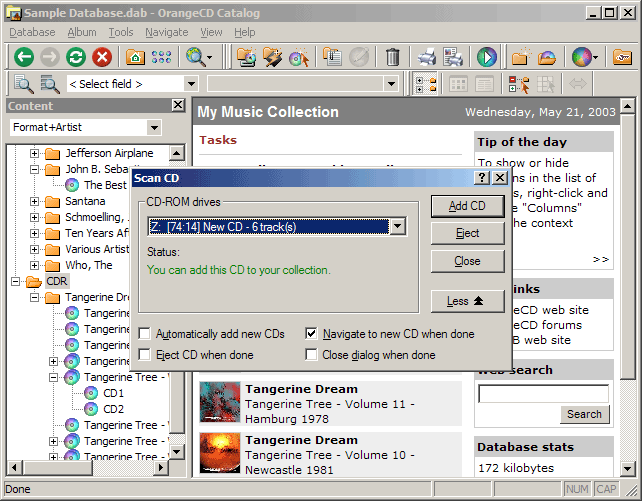
Anyone who tends to gather a large collection of CD’s like I do should be interested in a great shareware program from FireTongue software called OrangeCD that takes control and organizes your CD collection. Now you may be thinking, I have 500 CD’s, that’s too time consuming; the heart and soul of this program is its seamless integration with FREEDB.COM, a web service supported by users like you who want better media organization. There are many different ways to enter in music from your collection, clicking on “scan from CD ROM” will start the program scanning your CDROM drives for audio CD’s. When it finds an audio CD, the program then connects to FREEDB and collects the CD's correct information like album title, artist, track titles, times and special notes about the recording. It’s that easy!
Currently, I am using OrangeCD to catalogue my large collection of CD’s I recieve for music reviews and I have encountered very few CD’s that the program has not instantly recognized. So far, OrangeCD has saved hundreds of hours of manually entering information that sometimes can be very difficult to find and often means scouring amazon or other sites to pull information on one particular album. Some other cool features of OrangeCD is the ability to specify whether the album was a gift, how much it cost or whether it’s part of a compilation or a box set. You can also upload cover art into the database for each CD. Another nice feature of OrangeCD is its MP3 functionality. It’s not just limited to digital formats either, it will catalogue almost every media type but the auto-recognition is limited to CD’s and MP3’s only (Don’t try sticking a record or cassette tape into your CDROM drive). The program will also generate a variety of nice reports, graphs and with the included media player you can quickly preview a track, or listen while working. Simply put, this may not be the only program for cataloging media, but I have yet to find one that does it as easily as OrangeCD. Kudos to Andrei at FireTongue software for this great program!
OrangeCD Suite 5.1 is available for download as a trial version at www.firetongue.com/ and can be purchased from the company’s site for 34.95USD. Bulk orders and corporate licenses are available.
Subscribe to:
Posts (Atom)

